Each service is one file in `src/content/services/english/` and one page at `/services//`. The theme ships ten services in five **trades**: cleaning (standard, deep, move-out, office), repairs (small repairs, furniture assembly), windows, carpets, and outdoor (gutters, pressure washing).
The service files feed the services page (`/services/`), each service page, the booking form, the "what's included" checklists, and the structured data. The price of a service is not in its file: it comes from the **rate card with the same id** in the pricing file.
### The Services Page
`/services/` lists every published service grouped by trade, with a sticky row of trade links, then the cleaning comparison ("Which clean do I need?"), the add-ons, questions, and a call to action. The page and its blocks are set in `src/content/services/english/-index.md`:
```yaml
servicesSection:
options:
layout: "list" # default (photo cards by trade) | list (grouped rows)
jumpNav: true # list: sticky trade links with counts
groupByTrade: true # list: false gives one flat list
```
Each row shows the service `title`, `description`, `duration`, `crew`, `highlight`, and its "from" price. `pageHeader.summary: true` adds the line "5 trades · 10 services · from $75", counted from your files.
### Trades
Trades are defined once, under `trades:` in `src/content/services/english/-index.md`. Each trade is one group on `/services/`. The columns of the header's Services menu are written by hand: see [Menus](/homio/customization/menus/).
```yaml
trades:
- id: "cleaning"
label: "Cleaning"
description: "Recurring and one-off cleans, worked from a written checklist." # one-line promise
icon: "House" # Lucide name; the services `cards` and `columns` layouts
image: "/images/heroes/crew-wiping-table.jpg" # square crop beside the group on /services/
order: 1
```
- A service joins a trade with `trade: "cleaning"` and sets its place in it with `order`.
- Change a trade's `order` to move it on `/services/`.
- A trade with no published service is hidden.
- Keep trade ids identical in every language. The pricing file's rate cards use them too (`trade:`).
### A Service File
From `src/content/services/english/standard-cleaning.md`:
```yaml
title: "Standard clean"
description: "The recurring clean: kitchen, bathrooms, bedrooms, and floors, room by room, on the same checklist every visit."
trade: "cleaning" # trade id from `trades:` in -index.md
order: 1 # position inside the trade
image: "/images/services/standard-clean.jpg" # 4:5 photo, no people; service hero and social card
heroImage: "/images/services/standard-cleaning-at-work.jpg" # hero photo; empty uses `image`
heroImageAlt: "A cleaner tidying a bright bedroom"
duration: "2–3 h" # mono meta on the services index rows
crew: "Crew of 2"
highlight: "Supplies included" # one short fact on the services index row
price: "" # optional text instead of the rate-card "from" price, for example "Quote on visit"
code: "SC-01" # short code on the service ticket
related: ["deep-cleaning", "window-cleaning", "carpet-cleaning"]
options:
layout: "cleaning" # default | cleaning | repair | commercial
```
| Field | What it does |
| ------------------------------------ | --------------------------------------------------------------------------------------------------------------- |
| `title`, `description` | Name and one-line summary, in lists and the page header |
| `trade`, `order` | The trade group and the position inside it |
| `image`, `heroImage`, `heroImageAlt` | The card and social image, and the photo at the top of the service page |
| `duration`, `crew`, `highlight` | Short facts on the list row and in the service hero, written as you want them shown |
| `price` | Text that replaces the computed "from" price, such as "Quote on visit" |
| `code` | A short code on the service ticket ("No. SC-01") |
| `eyebrow`, `icon`, `serviceType` | Small label above the title; Lucide icon; the `serviceType` in structured data (empty uses the rate-card label) |
| `faq` | 3 to 6 questions shown on this service page. Empty hides the questions section |
| `related` | 3 service ids for "Often booked with". Empty uses the next services of the same trade |
| `included`, `extras`, `notIncluded` | The checklist (see "What's Included" below) |
| `options.layout` | The page template (see below) |
The URL comes from the file name: `standard-cleaning.md` is `/services/standard-cleaning/`. Each other language has a file with the **same name**, such as `src/content/services/french/`.
### Service Page Templates
`options.layout` in a service file picks one of four page templates. Each sets the hero and the order of the sections:
| Template | Hero | Then | Used by |
| ------------ | ---------------------------------------------- | --------------------------------------------------------------------------------------------------------------------------- | ------------------------------------------- |
| `default` | Facts and a static service ticket | Checklist, add-ons, an estimate section with the price breakdown, steps, reviews, a recent job, questions, related services | Windows, carpets, gutters, pressure washing |
| `cleaning` | The estimator, locked to this service | Checklist, add-ons, steps, a recent job, reviews, questions, related services | Standard, deep, move-out |
| `repair` | Hourly or per-item rate block and the job list | "Jobs we take on", a "Not our job" band, steps, reviews, questions, related services. No add-ons and no estimator | Small repairs, furniture assembly |
| `commercial` | Site ticket and a walkthrough button | Scope checklist, industry links, steps, a rating summary, questions, and the walkthrough form. No booking button | Office cleaning |
A section with no data hides itself: no rate card, no estimate; no `extras`, no add-ons; no `faq`, no questions; no project for this service, no recent job.
**Section copy shared by all service pages** is in `src/content/services/english/-index.md`:
- `detail:` holds the blocks every service page uses (`includedSection`, `addOnsSection`, `estimateSection`, `reviewsSection`, `questionsSection`, `ctaSection`, and more). `{service}` in a text becomes the service title: `title: "Price your {service}"`.
- `templates:` holds blocks for one template only (`cleaning`, `repair`, `commercial`), applied after `detail:`.
- A block in a service file wins over both, for that page only. For example, `standard-cleaning.md` adds a link under its checklist with an `includedSection:` block.
The service hero labels (the "What's included" link, "Send your list", "Request a walkthrough") are in `src/content/sections/english/service-hero-section.md`.
### What's Included
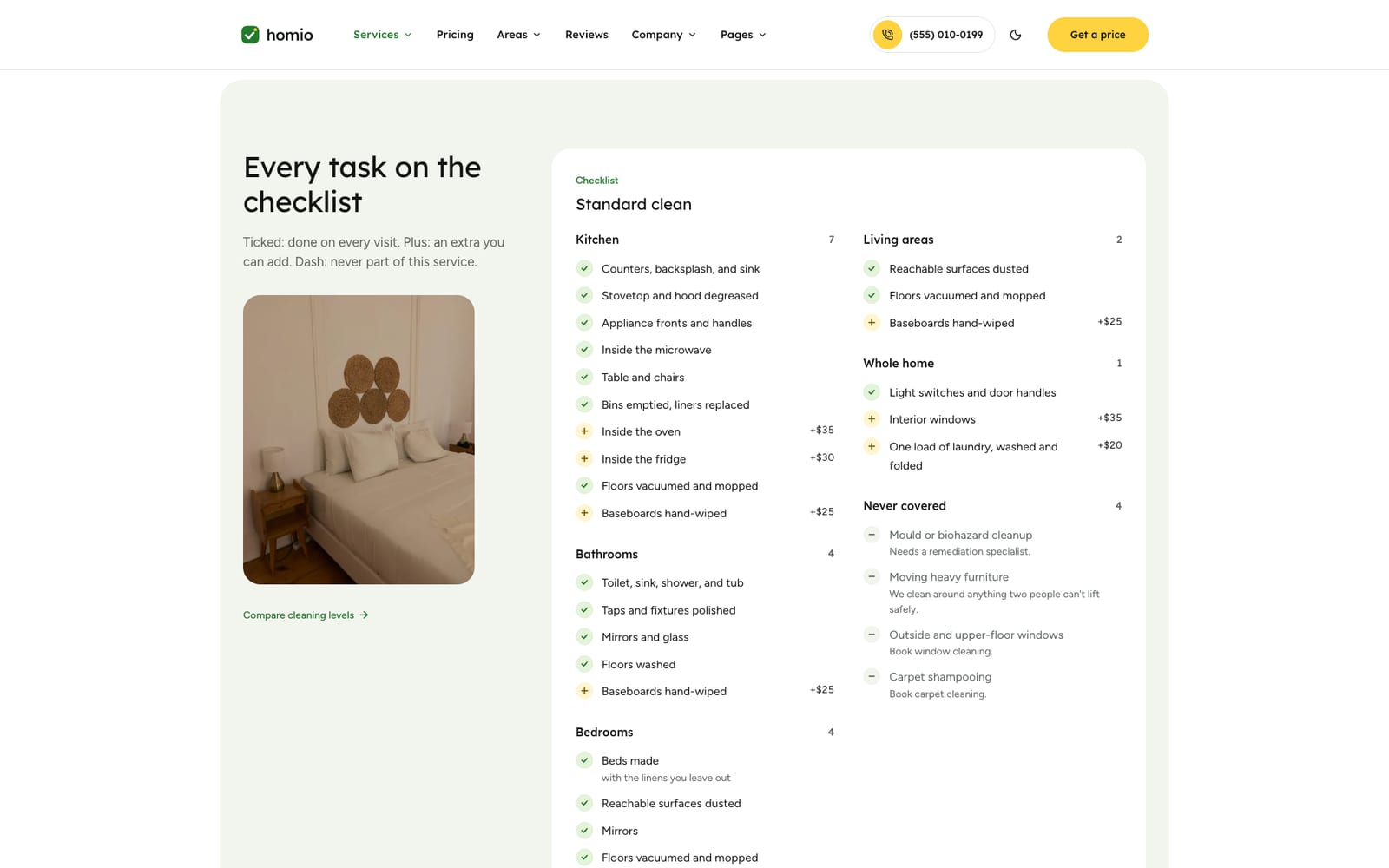
The checklists ("Every task on the checklist" on a service page, "Which clean do I need?" on `/services/`, "What each clean covers" on `/pricing/`, the checklist on `/how-it-works/`) all read one **task list** and three fields in each service file.
**1. The task list.** `rooms:` at the end of `src/content/services/english/-index.md` lists every task, grouped by room (or by job type for repairs):
```yaml
rooms:
- id: "kitchen"
label: "Kitchen"
tasks:
- { id: "counters", label: "Counters, backsplash, and sink" }
- { id: "inside-oven", label: "Inside the oven" } # matched by the `inside-oven` add-on's `task`
- { id: "floors", label: "Floors vacuumed and mopped" }
- id: "whole-home"
label: "Whole home"
tasks:
- {
id: "mold",
label: "Mould or biohazard cleanup",
note: "Needs a remediation specialist.",
}
```
`note` is a short detail under the task. For a task a service never covers, it is the reason. A task id can appear in several rooms (`floors`).
**2. The service's ticks.** Each service file says what it does with those tasks:
```yaml
# What gets done on every visit, by room
included:
kitchen:
[
"counters",
"stovetop",
"appliance-fronts",
"inside-microwave",
"table-chairs",
"trash",
"floors",
]
bathrooms: ["toilet-sink-shower", "sink-fixtures", "mirrors", "floors"]
# Priced extras: add-on ids from `addOns` in src/content/pricing/english/-index.md
extras:
["inside-oven", "inside-fridge", "interior-windows", "laundry", "baseboards"]
# Never done on this service: task ids, listed with the dictionary `note` as the reason
notIncluded: ["mold", "heavy-furniture", "upper-windows", "carpet-shampoo"]
```
Each task then shows one of three marks:
| Mark | When |
| ---------------- | ------------------------------------------------------------------------------------------------------------------- |
| Tick (included) | The task id is listed under that room in `included` |
| Plus and a price | An add-on in `extras` points at the task with its `task` field in the pricing file. The price comes from the add-on |
| Dash | Anything else. Tasks in `notIncluded` are listed under "Never covered" with their `note` |
So an extra appears in the checklist only when both are true: the service lists the add-on in `extras`, and the add-on has `task: ""` in the pricing file. Change the add-on price in the pricing file and the checklist updates.
A task row appears only when at least one compared service includes or offers it. Unknown room, task, or add-on ids are skipped, and the build prints an `[included]` warning naming them.
### The Comparison Section
`includedSection` sets which services a checklist compares:
```yaml
includedSection:
title: "Which clean do I need?"
services: ["standard-cleaning", "deep-cleaning", "move-out-cleaning"]
featured: "deep-cleaning"
rooms: ["kitchen", "bathrooms"] # room ids shown first
showAllRooms: true # `default` layout: the other rooms open with "Show all rooms"
options:
layout: "default" # default (columns by service) | rooms (tabs by room)
```
- `services`: 1 to 4 service ids. One service shows a single checklist card; 2 to 4 show a comparison with one column per service.
- `featured`: the outlined column, shown first on phones.
- `rooms`: the rooms to show; empty shows every room. `showAllRooms: true` keeps the others behind a "Show all rooms" button.
- `showPrices` (default `true` in `src/content/sections/english/included-section.md`): the "from" price under each column name and the add-on prices.
- Layouts: `default` (columns by service) or `rooms` (one tab per room).
### Prices On Service Pages
A service page prices itself from the rate card whose `id` equals the service file name (`standard-cleaning`):
- The "from" price in the hero and on `/services/`, the booking tile, and the estimator all come from that card. See [Pricing & The Estimator](/homio/customization/pricing-estimator/) for the formula.
- The add-ons section ("Add to this visit") lists the pricing-file add-ons whose `services` include this service, with their prices. It shows on `default` and `cleaning` pages when the service file has at least one id in `extras`. Keep `extras` and the add-ons' `services` lists in step.
- No rate card with that id: the page shows "Price on request", no estimator, and the service is not offered on `/book/`. Use `price: "Quote on visit"` to write your own text.
### Add A Service
1. Copy a service file close to the new one, for example `window-cleaning.md`, and rename it (`oven-cleaning.md`). The file name is the URL and the id.
2. Change `title`, `description`, `trade`, `order`, the photos, the facts, `faq`, `related`, and the checklist fields. Pick `options.layout`.
3. Add new tasks to `rooms:` in `src/content/services/english/-index.md` if the checklist needs them.
4. Add a rate card with `id: "oven-cleaning"` to `src/content/pricing/english/-index.md`. Without one the service shows "Price on request".
5. Do the same in each other language: the service file with the same name, such as `src/content/services/french/`, the tasks in its `-index.md`, and the rate card (same numbers) in its pricing file.
6. Add its link to the header's Services menu, and to the footer's Services column if you want it there, in each `src/config/menu..json`. `/services/` and `/book/` pick the service up on their own.
To hide a service, set `draft: true` in every language file. To remove it, delete those files, its rate card in every pricing file, and every reference to its id: `related` in other services, `services` lists in `includedSection` and `estimateSection` blocks, reviews (`service:`), projects (`service:`), areas (`services:`), and the menus. Run `npm run astro-check` and `npm run build`, and read the warnings.
### Do It With AI
```text
Add a service "[NAME]" in the [TRADE] trade, priced [per room | per hour | per unit: UNIT] at
[RATES], minimum [X]. Copy src/content/services/english/[SIMILAR].md to a new file named
[slug].md, use the [default | cleaning | repair] template, and fill in the description, facts,
3 questions, and the checklist: included [TASKS], never covered [TASKS]. Add the rate card with
the same id to src/content/pricing/english/-index.md. Do the other language files with the same file
names and numbers, then run npm run astro-check.
```
```text
Update what my Standard clean includes: [LIST BY ROOM]. Add-ons offered: [NAME: PRICE]. Never
covered: [TASKS, with a one-line reason]. Use the task ids in rooms: in
src/content/services/english/-index.md (add new tasks there if needed), and set task: on each
add-on in the pricing file so it shows in the checklist. Do the other language files too.
```